CompareMedsRx - Search Results Redesign

live project

WEB APP

INTERACTION DESIGN

MOBILE + DESKTOP

RAPID PROTOTYPING

live project

WEB APP

INTERACTION DESIGN

MOBILE + DESKTOP

RAPID PROTOTYPING

task

Led the redesign of CompareMedsRx’s prescription search experience across desktop and mobile, simplifying price comparison by automatically surfacing the lowest available discount for each pharmacy. Partnered with stakeholders and developers through implementation to ensure the shipped experience aligned with the intended Figma designs.

This case study covers the search engine web app. The HubSpot marketing platform overhaul is a separate case study.

TL;DR (Project Overview)

strategic impact

Design to Handoff

0.5 months design, 0.5 months iteration

Desktop + Mobile

Full responsive coverage across both surfaces

Rapid Prototyping

Rapid Prototyping

Directly to high fidelity, no wireframe phase

Rapid Prototyping

Directly to high fidelity, no wireframe phase

BEHAVIOR-INFORMED DESIGN

HotJar analytics on the previous design showed key friction points that shaped redesign priorities

DATA AGGREGATION CONSTRAINTS

Filtering options were scoped to what the underlying discount card APIs could support without degrading search performance across 20+ providers

HIGH-FIDELITY FIRST

Timeline demanded direct prototyping; iteration happened in Figma, not wireframes

design constraints

BEHAVIOR-INFORMED DESIGN

HotJar analytics on the previous design showed key friction points that shaped redesign priorities

DATA AGGREGATION CONSTRAINTS

Filtering options were scoped to what the underlying discount card APIs could support without degrading search performance across 20+ providers

HIGH-FIDELITY FIRST

Timeline demanded direct prototyping; iteration happened in Figma, not wireframes

strategic impact

Design to Handoff

0.5 months design, 0.5 months iteration

Desktop + Mobile

Full responsive coverage across both surfaces

Rapid Prototyping

Directly to high fidelity, no wireframe phase

BEHAVIOR-INFORMED DESIGN

HotJar analytics on the previous design showed key friction points that shaped redesign priorities

DATA AGGREGATION CONSTRAINTS

Filtering options were scoped to what the underlying discount card APIs could support without degrading search performance across 20+ providers

HIGH-FIDELITY FIRST

Timeline demanded direct prototyping; iteration happened in Figma, not wireframes

design constraints

context

About CompareMedsRx

CompareMedsRx helps people find the lowest cash price on prescriptions by comparing 20+ discount cards and 70,000+ pharmacies. The company is also offered to employers & PEOs as a healthcare benefit for their members, sometimes through co-branded experiences built specifically for their audience.

The search results page is the moment a user transitions from browsing to acting. They have their medication name, and just need a price and a coupon they can show a pharmacist. Every design decision on this page was made to shorten that path, reduce the number of choices required to get there, and make the system feel like it already did the work for them.
the problem

Disconnected & too many decisions

  • 1

  • 2

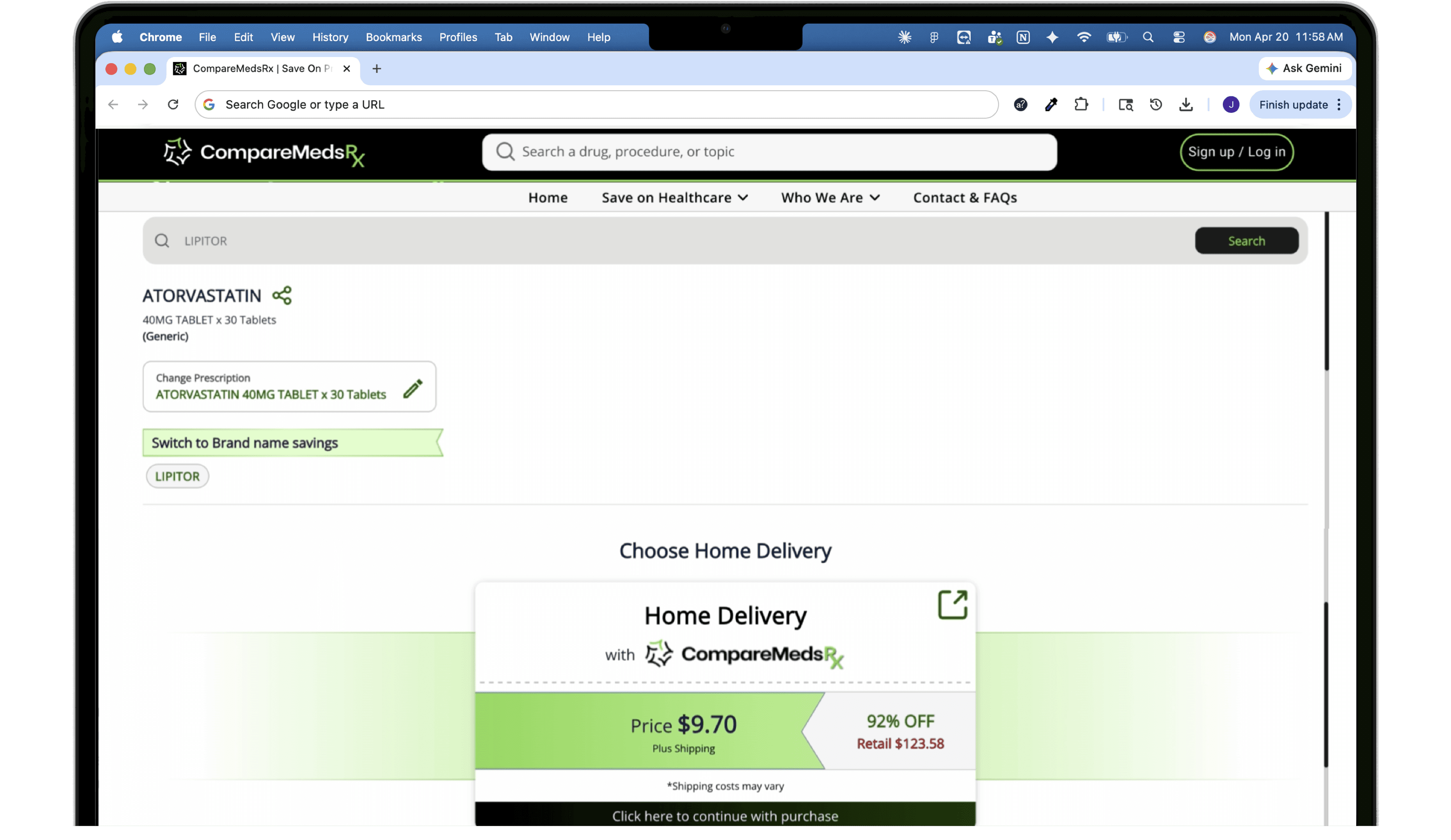
1: Oversized home delivery card dominated the first viewport while the actual pharmacy pricing sat below, requiring users to scroll before reaching the core value of the page.

2: Choosing a provider was presented as a required step with no guidance, creating unnecessary cognitive load for a decision the system should have been making automatically.

the solution

System selects the discount card, user selects the pharmacy

BEFORE

4 steps to coupon

Search a medication

Enter Drug name + zip code

Choose a pharmacy

From filtered results list

Choose a discount card

RxGO, BuzzRx, SingleCare, etc.

View updated coupon

See BIN / PCN / Group / Member ID

after

3 steps to coupon

Search a medication

Enter Drug name + zip code

Choose a pharmacy

Cheapest card auto-attached

View updated coupon

See BIN / PCN / Group / Member ID

Explore other discount cards

*Available if needed, out of critical path

BEFORE

4 steps to coupon

Search a medication

Enter Drug name + zip code

Choose a pharmacy

From filtered results list

Choose a discount card

RxGO, BuzzRx, SingleCare, etc.

View updated coupon

See BIN / PCN / Group / Member ID

after

3 steps to coupon

Search a medication

Enter Drug name + zip code

Choose a pharmacy

Cheapest card auto-attached

View updated coupon

See BIN / PCN / Group / Member ID

Explore other discount cards

*Available if needed, out of critical path

BEFORE

4 steps to coupon

Search a medication

Enter Drug name + zip code

Choose a pharmacy

From filtered results list

Choose a discount card

RxGO, BuzzRx, SingleCare, etc.

View updated coupon

See BIN / PCN / Group / Member ID

after

3 steps to coupon

Search a medication

Enter Drug name + zip code

Choose a pharmacy

Cheapest card auto-attached

View updated coupon

See BIN / PCN / Group / Member ID

Explore other discount cards

*Available if needed, out of critical path

One step removed

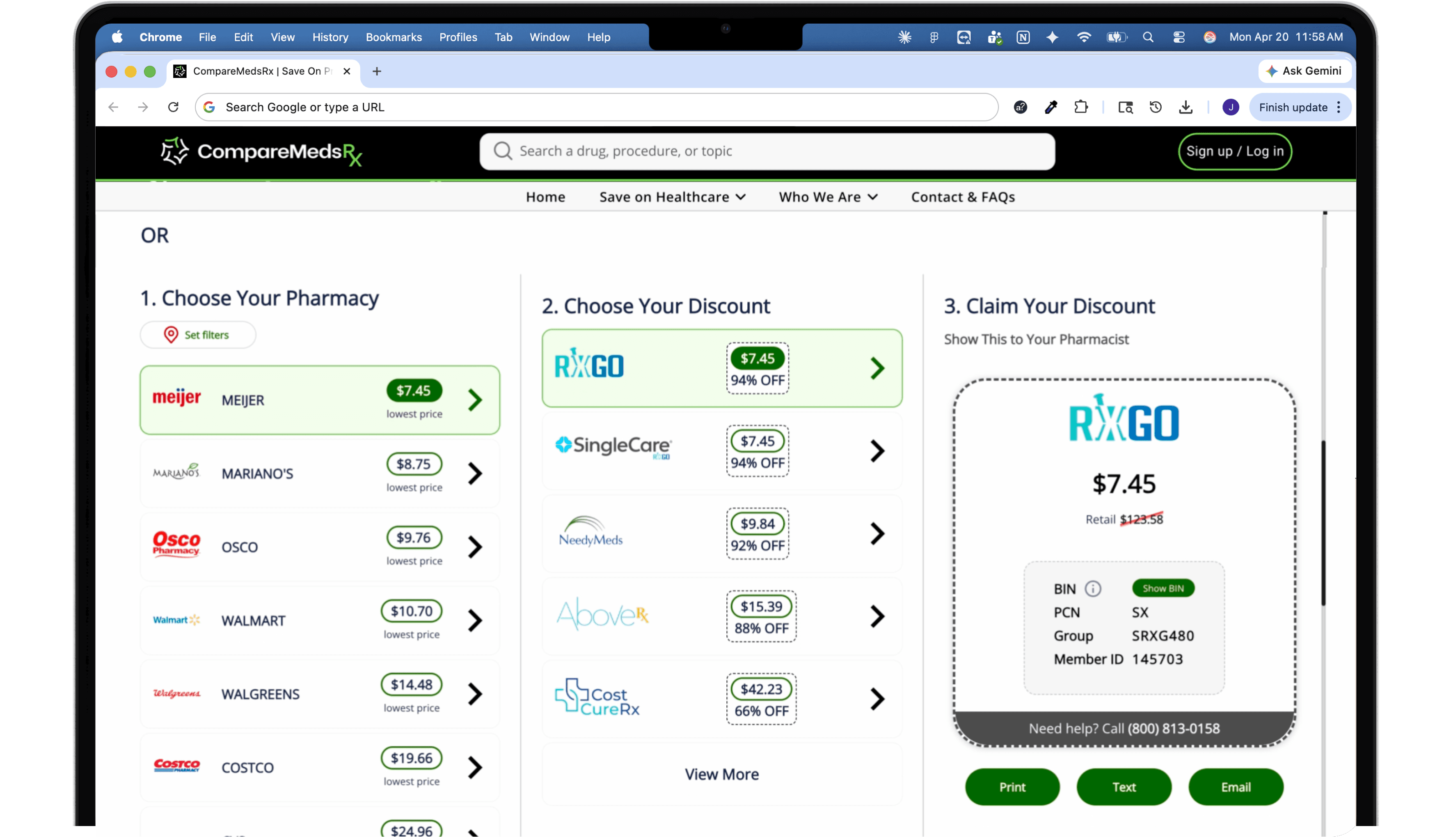
The original flow forced users to manually pick a discount card after selecting a pharmacy. The redesign automates this: the cheapest card is now attached automatically to the pharmacy result. If a card isn’t accepted, the next best option is one tap away in a collapsed section below; visible but unobtrusive.

One step removed

The original flow forced users to manually pick a discount card after selecting a pharmacy. The redesign automates this: the cheapest card is now attached automatically to the pharmacy result. If a card isn’t accepted, the next best option is one tap away in a collapsed section below; visible but unobtrusive.

BEFORE

4 steps to coupon

Search a medication

Enter Drug name + zip code

Choose a pharmacy

From filtered results list

Choose a discount card

RxGO, BuzzRx, SingleCare, etc.

View updated coupon

See BIN / PCN / Group / Member ID

after

3 steps to coupon

Search a medication

Enter Drug name + zip code

Choose a pharmacy

Cheapest card auto-attached

View updated coupon

See BIN / PCN / Group / Member ID

Explore other discount cards

*Available if needed, out of critical path

One step removed

The original flow forced users to manually pick a discount card after selecting a pharmacy. The redesign automates this: the cheapest card is now attached automatically to the pharmacy result. If a card isn’t accepted, the next best option is one tap away in a collapsed section below; visible but unobtrusive.

One step removed

The original flow forced users to manually pick a discount card after selecting a pharmacy. The redesign automates this: the cheapest card is now attached automatically to the pharmacy result. If a card isn’t accepted, the next best option is one tap away in a collapsed section below; visible but unobtrusive.

the solution

System selects the discount card, user selects the pharmacy

the problem

Disconnected & too many decisions

  • 1

  • 2

1: Oversized home delivery card dominated the first viewport while the actual pharmacy pricing sat below, requiring users to scroll before reaching the core value of the page.

2: Choosing a provider was presented as a required step with no guidance, creating unnecessary cognitive load for a decision the system should have been making automatically.

the problem

Disconnected & too many decisions

  • 1

  • 2

  • 1

  • 2

1: Oversized home delivery card dominated the first viewport while the actual pharmacy pricing sat below, requiring users to scroll before reaching the core value of the page.

2: Choosing a provider was presented as a required step with no guidance, creating unnecessary cognitive load for a decision the system should have been making automatically.

the problem

Disconnected & too many decisions

1: Oversized home delivery card

dominated the first viewport while the actual pharmacy pricing sat below, requiring users to scroll before reaching the core value of the page.

2: Choosing a provider

was presented as a required step with no guidance, creating unnecessary cognitive load for a decision the system should have been making automatically.

the problem

Disconnected & too many decisions

1: Oversized home delivery card

dominated the first viewport while the actual pharmacy pricing sat below, requiring users to scroll before reaching the core value of the page.

2: Choosing a provider

was presented as a required step with no guidance, creating unnecessary cognitive load for a decision the system should have been making automatically.

design outcome

Pricing visible, path clear

Search to coupon: Pharmacy options and pricing load together on a single surface. Selecting a different pharmacy updates the coupon panel instantly. The full redemption path sits in one view.

Search to coupon: Pharmacy options and pricing load together on a single surface. Selecting a different pharmacy updates the coupon panel instantly. The full redemption path sits in one view.

For the full experience with auto-playing walkthroughs, view on desktop.

what's next

The search experience is intentionally scoped to what the current data partnerships support. Distance-based filtering and more precise pharmacy location matching are both on the roadmap, pending deeper integration with discount card providers. The current design was built to perform well within those constraints while leaving clear room for those features to be added without restructuring the interface.

This case study covers the search engine web app. The HubSpot marketing platform overhaul is a separate case study.

© 2026 · Julia Cagnina

© 2026 · Julia Cagnina